


LED screen components come in various sets and inclusions, depending on how you want your device to perform well. Some ensembles only include the basic components for the device to run. Meanwhile, some have complete setups with additional accessories to elevate the operation of the device.
Light-emitting diodes are powerful semiconductors that make it possible for these advanced screens to successfully operate. However, that’s not all there is to these LED products. To provide the audience with stunning visuals, these LED screen components need to work excellently together:
1. LED Unit Board

This is one of the vital LED screen components that make it possible for the advanced display to operate. It is a combination of several relevant components, including the following:
- LED Module
- Empty cabinet
- Power supply
- Reciving card
- Fans
- Cables
2. LED Module
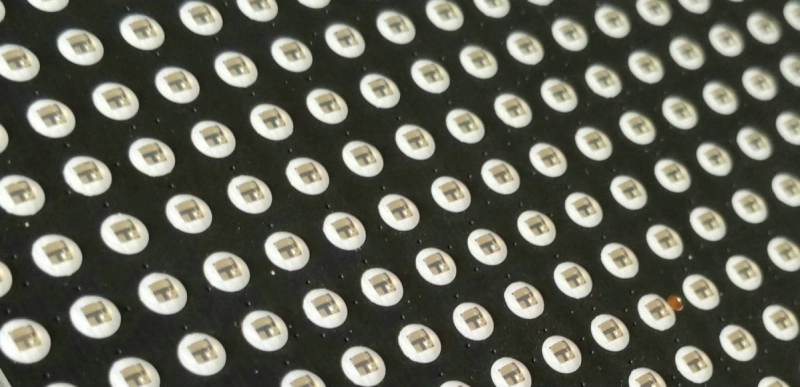
One of the vital LED screen components, the LED module carries the groups of pixels that make the display do what it does.
Made from plastic or resin, it protects the groups of LED lights embedded in the PCB. These LED modules come in different sizes and shapes, along with the following components:
- Plastic shell
- PCB
- Lamps
- ICS
- Resistor
- Capacitor
- ribbon cable connector
- DC 5V connector
- Masks
3. Driver ICs

Driver Integrated Circuits (ICs) are the electronic element among all the other LED screen components. They control how each LED pixel operates, like the conductor of an orchestra. They deliver the following functions:
- Time and electricity management for LEDs
- Ensures color accuracy and visual texture
- Controls vital features, such as grayscale levels and refresh rate
These LED screen components make it possible for the LEDs to light up when they need to. Without them, these diodes will just function like a normal light fixture.
4. Control System

This refers to the LED screen component that acts as the brain of the entire device. It is the area where these functions are operating:
- Brightness and color contrast regulation
- Special effects: fading and voice activation
Among all the LED screen components, it gets data from input sources, such as cameras, computers, and media players. The system then transforms the data into signals so that they can be shown on screen. Some of its key features are the following:
- Resolution support
- Processing speed
- Networking options
Without a working and effective control system, the display won’t be able to show what you want the device to display.
5. Receiving Cards

This component is responsible for receiving and sending data to the control system for processing before having it sent to the LED modules. Some of the processes that happen in this area are the following:
- Error checking
- Data decoding
- Signal synchronization
Among all the LED screen components, receiving cards play a crucial role in data delivery, and without them or if they malfunction, you’ll end up with the wrong content. This is why choosing the right receiving card will guarantee fast, reliable, and accurate data delivery throughout the entire ensemble.
6. Power Supply
 power supply
A power supply refers to the device that converts electricity into a form usable in your LED screen. Among all the LED screen components, it makes sure that your device is using the right type of current, which is direct current, so that the device can operate effectively and safely at the same time. This is made possible through a reliable switching power supply.
A switching power supply can be one of the best LED screen components to invest in. It helps to provide accurate and stable power for your LED screen. However, it’s important to choose a good-quality power supply for your device to rely on. Here are the qualities you need to look for:
- Energy Efficiency – Power supply is the device you rely on for electric conversion, and possibly saving as much energy as possible. Get a good power supply with at least 80% energy efficiency to guarantee less energy loss, less heat, and lower electricity costs.
- Stability – When you get a stable power supply for your LED screen, you can guarantee that your device lasts longer. Because it produces smooth output current, it generates less heat, which translates to a lower chance of your device overheating and having issues, from screen flickers to longer-term damage.
- Build Quality – Choose a power supply with a clean and simple internal layout that’s easy to understand and simple to operate.
- Power Factor Correction – This helps make sure that you reduce power loss and wasted electricity as much as you can by reducing the reactive power of the current. Look for a power supply that has a good PFC to make the most of this incredible feature.
7. Wires

Wires and connectors play huge roles in this ensemble. These LED screen components make sure that all the vital components are connected. They serve as pathways of data and power that will keep the flow running throughout the system.
These cables need eed to have the following components to remain effective and high-quality:
- Excellent signal bandwidth
- Proper shielding
- Strong connectors
If the wires don’t do their job well or are not connected properly, your LED display may experience the following issues:
- Display errors
- Signal loss
- Unlit sections on the LED module
- Collapsed bridges
To better understand the different cables that run through your device, here are the basic types of wires you need for your LED display:
Data Cables
These flat cables are the connections that run between the LED boards and the control cards. They are responsible for making sure that content data reaches the screen.
Transmission Cables
These refer to the connections running from the computer to the control card. They send content data to the control card from the source, which can be a computer or a laptop.
Power Cables
These cables, just as they are named, ensure that your entire system gets the electricity it needs. It starts from the power source towards the control card and the LED unit boards. For this type of cable, a 1 mm diameter copper core is recommended to ensure a stable and safe flow of electricity.
8. Cabinet and Enclosure

This refers to the LED screen components that hold the device together. These cabinets are used to assemble the LED modules. The modular construction of the device won’t work effectively without them. Here are some of the features to look for
- Durability
- Lightweight feature
- High IP rating
- Resistance to external forces (dust, moisture, and physical damage)
Without this component, your LED module and all its internal components will be exposed to elements that can damage them. Besides that, it can also lead to shortening the lifespan of your device or reducing the quality of your screen’s performance. Just make sure to keep your device in one place and to choose a cabinet based on your display’s size, design, material, and application.
9. Cooling System

The cooling system is also one of the vital LED screen components, despite always being overlooked. While LED screens do not get as hot as traditional displays, there’s still heat being generated in the furnace when it operates. And adding good airflow to the system can calm that heat and make sure that everything’s safe and in top condition.
A cooling system in LED screens may come in the following forms:
- Fans
- Heat sinks
- Vents
While different from each other, these three can help prevent your LED display from overheating. They differ in the amount of airflow and noise. Make sure you match your choice of cooling system with how much heat your system can handle to avoid the following issues:
- Poor performance
- System errors
- Permanent damage
10. Software Interface
 novastar software download
The LED control software functions as the manager of your basic LED screen settings. Among all the LED screen components, it takes care of your content and all the things you need to do to ensure that your screen shows the content you chose in the way you want it to be.
Here are some of the features you can access from the software:
- Upload and organize media content
- Change and edit content (real-time)
- Schedule content playback
A reliable LED control software not only performs its duties well. It also provides everything necessary to make it convenient for you to manage the content in your display. This includes the following:
- Remote access feature
- User-friendly interface
- Wide media format support
Without an excellent LED control software to assist you, managing your LED screen may be a horrible experience. Investing in it will be the best option for you.
Conclusion
LED screen components come in various elements that need to work together so that your LED screen can successfully operate. From simple LED boards to more complex control systems and software, all of the pieces of the puzzle need to be there to complete your LED display masterpiece. And learning about each of them is a good start in diving into this industry and knowing what you’re investing in.

