


As we move faster into the future, one of the things we see every day is the display technology in our devices. LCDs were the early standard in displays, then came LEDs (Light Emitting Diodes) that produce crisper, more vibrant images while being eye-friendly at the same time. AMOLED is the king of high-end displays right now.
We all know how LED stacks up against LCD, but how does this new display technology compare to the latter? We’ll find out in this blog.
What is AMOLED
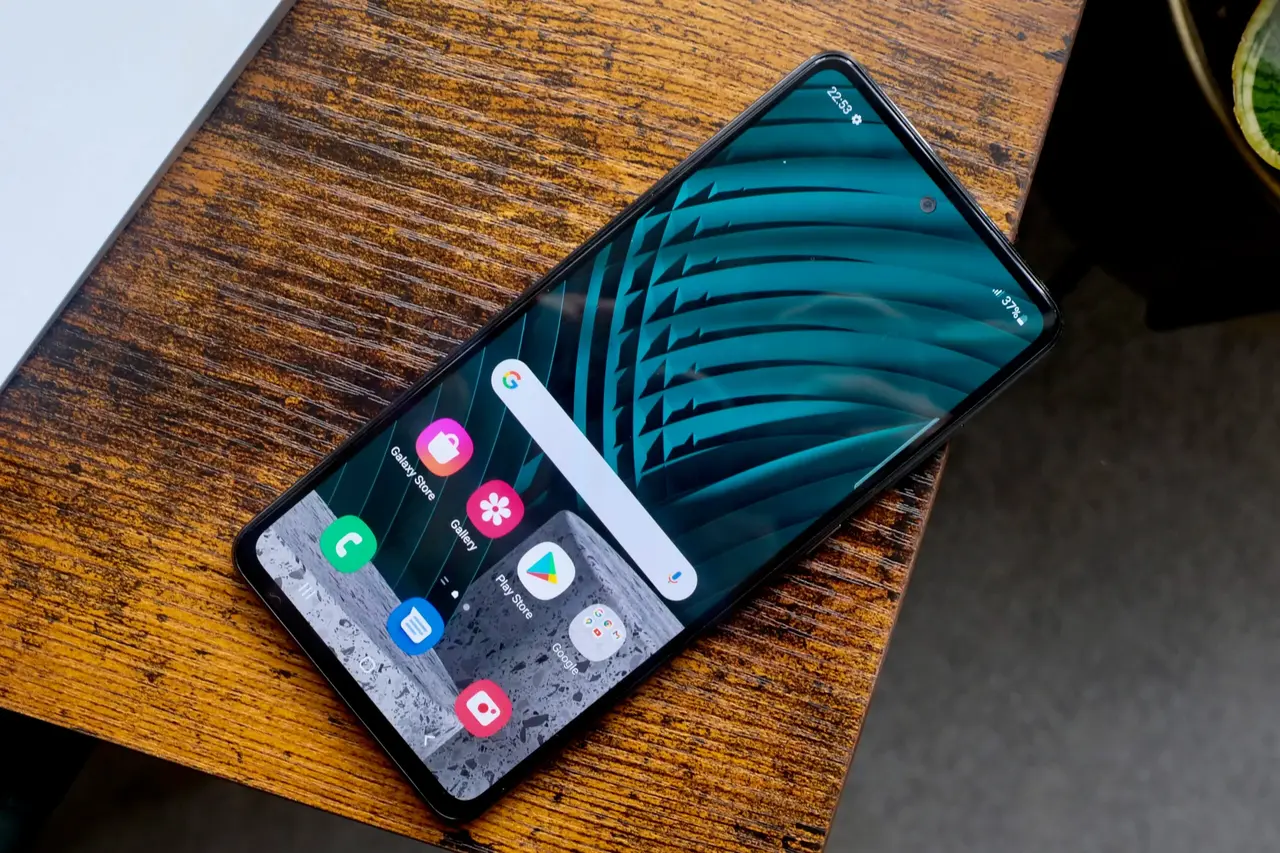
AMOLED is a sub-branch of OLED. While they use the same principle of electrified organic matter, AMOLEDs use “advanced matrix” to have better control over individual pixels. This ability to emit light per pixel not only improves the visual quality but also power efficiency as pixels not in use (black areas) are off, saving power.
How AMOLED Display Works

Red, green, and blue subpixels make up the pixels in AMOLEDs. These subpixels combine to produce the colors you see on the screen.
1. Organic Layers
- Emitter Layer: This layer produces the light you see on the display.
- Conductive Layer: Allows the flow of electrons and holes (positive charges) to create light in the emitter layer.
2. Active Matrix
The “active matrix” is what makes AMOLED different from passive matrix OLED.
- Thin-Film Transistors (TFTs): Paired with a capacitor and a pixel for better local dimming.
- Capacitors: Stores electrical charges to hold the pixel’s state until next refresh cycle.
This means:
- Faster Refresh Rates: Good for smooth motion in videos and gaming.
- Better Image Quality: Each pixel can be turned on or off with precision, resulting to clearer images.
3. Self-Luminescence
- Blacker Blacks: Local dimming on individual pixels
- Results in: Lower energy consumption.
4. Color Filters and Layers
AMOLED screens use subpixels:
- Each pixel has red, green and blue (RGB) subpixels.
- These combine to produce millions of colors, wide color gamut and high saturation.
AMOLED Display Types
AMOLED’s versatility has given birth to several types, each designed to improve the original technology. These types are for different needs such as increasing brightness, reducing blue light or supporting flexible screen design.

1. Super AMOLED
- Developer: Samsung
- Features: Combines the touch layer directly with the display, no need for separate touch layer.
- Benefits: Thinner, brighter, more responsive and power efficient than standard AMOLED.
2. Dynamic AMOLED
- Additional Features: Supports HDR10+ for wider dynamic range and more colors. Also has reduced blue light emission for eye health.
- Brightness: Brighter displays are great for outdoor use.
3. Flexible AMOLED
Flexibility: Uses plastic instead of glass for:
- Curved screens (e.g. modern smartphones).
- Foldable devices (e.g. foldable phones and tablets).
- Rollable displays for futuristic designs.
4. Transparent AMOLED
- Transparency: Shows content through the display.
- Applications: Used in heads-up displays (HUDs), augmented reality (AR) devices and futuristic window displays.
5. Rigid AMOLED
- Structure: Glass substrates.
6. QHD and 4K AMOLED
- Resolution: For ultra-high resolutions like Quad HD (2560×1440) and 4K (3840×2160).
- Applications: For devices that requires extreme detail, like VR headsets and premium smartphones.
LCD Technology
LCD or Liquid Crystal Display is one of the earliest commercialized display technologies. It relies on a separate light source to backlight a liquid crystal layer to produce images, whereas AMOLED can produce its own. This is why LCD technology doesn’t have the deep blacks of AMOLED since it relies on backlighting but it has good brightness and color accuracy that’s why it’s popular in many devices, mid-range and budget smartphones, computer monitors and televisions.
How LCD Technology Works

LCDs are composed of liquid crystal layers, polarizing filters and light source, often LEDs. Here’s how each works:
- Backlight: Backlight is a constant light source that shines through the liquid crystal layers. Unlike AMOLED that turns pixels on and off, LCD uses backlight to illuminate the screen all the time, so black levels are not as deep.
- Liquid Crystal Layer: Liquid crystals when exposed to electric current, twist to allow or block light, create the colors and brightness levels.
- Polarizing Filters: These filters control the alignment of light waves as they pass through the display, improve color accuracy and reduce glare.
- RGB Subpixels: Each pixel in LCD is divided into red, green and blue subpixels. These subpixels combine to produce the full spectrum of colors displayed on the screen.
- Response Mechanism: Liquid crystals adjust their alignment in response to electric current which determines the brightness of each pixel.
AMOLED vs LCD: Comparison
Visual Quality
Both technologies have excellent images but they perform differently when it comes to color accuracy, contrast and brightness.
| Feature | AMOLED | LCD |
|---|---|---|
| Contrast Ratio | Infinite contrast, true blacks | Lower contrast, blacks are grayish due to backlight |
| Color Accuracy | Vibrant and saturated colors | Accurate but less vibrant than AMOLED |
| Brightness | Lower peak brightness in direct sunlight | High brightness, better for outdoor visibility |
| Response Time | Extremely fast, great for fast-moving content | Slower response, can result in motion blur |
| Viewing Angles | Excellent color consistency at all angles | Reduced brightness and color shift at angles |
Contrast Ratio
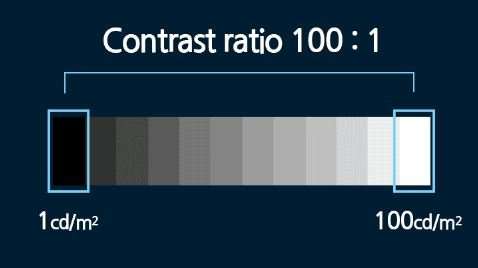
AMOLED Contrast Ratio
AMOLED has better contrast ratio because its pixels are self-luminescent, resulting in deeper blacks and brighter whites. That means infinite contrast ratio as the colors between the darkest and brightest are theoretically unlimited.
- True Blacks: Pixels that are off emit no light, so black areas are black.
- Infinite Contrast: Since black pixels emit no light, the contrast ratio is calculated as the brightest white divided by zero, which is infinite.
- Dynamic Range: Colorful and deep blacks for better viewing in low light.
LCD Contrast Ratio
LCDs or Liquid Crystal Displays use a backlight to illuminate the entire screen regardless of the content being displayed. This backlighting system prevents true blacks as light leaks even in dark areas.
- Backlight Dependency: Black areas of an LCD look gray because the backlight cannot be blocked completely by the liquid crystals.
- Typical Contrast Ratio: Most LCDs have a contrast ratio of 1000:1 to 3000:1 depending on the panel and backlight technology.
- Improved Technology: IPS (In-Plane Switching) or Mini-LED LCDs improve contrast but still can’t match AMOLED.
Color Accuracy and Vibrancy

When comparing AMOLED and LCD displays, color accuracy and vibrancy are two key factors to consider. Here’s how they fare:
AMOLED Displays
AMOLED screens are known for their rich and saturated colors and wide color gamut.
Color Accuracy
- Vibrancy Over Accuracy (Default):
- By default, AMOLED screens are highly saturated which can look unrealistic sometimes.
- Manufacturers like Samsung have vivid modes that amplify colors for a more punchy effect, especially for multimedia and gaming.
- Custom Calibration:
- High-end AMOLED panels (like flagship smartphones) now allow color profile adjustment so they can produce accurate colors when calibrated to sRGB or DCI-P3.
Vibrancy
- Wide Color Gamut:
- AMOLED panels support broader color gamuts like HDR10+ or DCI-P3 for more dynamic and vivid visuals.
- High Contrast Enhances Colors:
- Infinite contrast of AMOLED makes colors look richer as there’s no light bleed to dilute dark areas.
- Brightness Impact:
- AMOLED displays can maintain color vibrancy even at lower brightness, making them more appealing in low light.
LCD Displays
LCD screens especially IPS (In-Plane Switching) technology is known for natural color reproduction and consistency.
Color Accuracy
- Neutral and Realistic:
- LCDs produce more accurate and neutral colors out of the box especially in professional-grade monitors.
- Suitable for color-critical work like photo editing and graphic design.
- Limited by Technology:
- While modern LCDs can produce wide color gamuts (e.g. Quantum Dot or Mini-LED), they still can’t match AMOLED in terms of dynamic range.
Vibrancy
- Backlight Limitation:
- LCDs use a backlight which can wash out colors especially in dark scenes.
- Brightness Dependent
Response Time
AMOLED
- Faster Response: AMOLED pixels can turn on or off almost instantly since each pixel produces its own light.
- Typical Response Time: Less than 1 millisecond.
- Advantage: Minimal motion blur, perfect for gaming and fast-moving visuals like action movies or sports.
LCD
- Slower Response: Relies on liquid crystals to align to control light from the backlight which is slower than direct pixel illumination.
- Typical Response Time: 5-10 milliseconds depending on the panel type (e.g. TN is faster than IPS).
- Disadvantage: Slight motion blur in fast-moving scenes, but Overdrive can help to improve this.
Viewing Angles
AMOLED
- Wide Viewing Angles: Light is emitted from pixels so minimal color or brightness distortion even at extreme angles.
- Advantage: Colors are still vibrant and images are clear from almost any angle.
LCD
- Varies by Panel Type:
- IPS LCD: Good viewing angles but not as wide as AMOLED.
- TN Panels: Limited viewing angles, color and brightness shift at off-angles.
- Limitation: Slight washout or color shift at sharper angles.
Efficiency
Energy efficiency is a big factor when choosing a display especially in portable devices like smartphones. AMOLED’s self-illuminating pixels is more efficient when displaying darker content since only active pixels consumes power. LCDs with backlight uses consistent power regardless of content.
| Energy Feature | AMOLED | LCD |
|---|---|---|
| Power Consumption | Lower when displaying dark content, pixels are off | Always uses the same amount of power due to backlight |
| Efficiency in Dark Mode | Very efficient, black pixels consume no power | Less efficient, backlight is always on regardless of content |
| Brightness Control | Dynamic brightness at pixel level | Entire screen brightness is controlled by backlight |
AMOLED
- Super efficient for Dark Content: AMOLED pixels can be turned off completely to show black which saves a lot of battery for interfaces or themes with dark theme.
- Disadvantage: Power consumption increases for content with bright or white-heavy backgrounds as all pixels needs to emit maximum light.
LCD
- Constant Power Usage: Uses a backlight that consumes the same power regardless of the content’s brightness or darkness.
- Advanced Technologies: Mini-LED and local dimming zones can improve efficiency but still not as efficient as AMOLED for dark content.
Durability and Longevity
Durability and longevity is a big consideration for any display. AMOLED and LCD differ greatly when it comes to lifespan, burn-in and overall performance over time.
| Durability Feature | AMOLED | LCD |
|---|---|---|
| Burn-In | Susceptible to burn-in with static content | No burn-in issues |
| Pixel Lifespan | Pixels degrade over time, especially blue subpixels | Pixels last longer, but backlight can degrade |
| Overall Lifespan | Lasts for several years with proper care | Lasts longer due to more uniform pixel degradation |
| Impact of Heat/Sunlight | Sensitive to high temperatures and direct sunlight | More resistant to heat and sunlight |
| Repair Costs | More costly to repair due to complexity | Cheaper to repair |
- Burn-In and Image Retention: AMOLEDs may have burn-in with static images displayed. LCDs don’t suffer from burn-in so it’s more suitable for applications where static content is displayed for long periods.
- Pixel Lifespan: AMOLED pixels degrade over time, especially the blue subpixels which can cause color shift and reduced brightness. LCDs have la onger lifespan for individual pixels but can degrade backlight over time.
- Overall Lifespan: While LCDs last longer, AMOLED displays can last for several years especially with the newer models that addresses burn-in and pixel degradation.
- Impact of Heat and Sunlight: AMOLEDs are known for their great colors and contrast but are more prone to damage from heat and sunlight due to their organic components which can degrade over time with prolonged exposure and cause burn-in. LCDs are more durable in such conditions so are better for high heat or direct sunlight environments but lag behind AMOLED in terms of image quality and contrast.
- Long-Term Uniformity: Over time AMOLED displays can suffer from uneven pixel aging which can cause brightness discrepancies. LCDs tend to maintain uniformity for a longer period especially in static content applications.
- Repair and Replacement: AMOLED displays are more expensive to repair or replace due to the complex manufacturing process and organic material. LCD repairs are more affordable since it’s simpler design and widely available parts.
Cost and Availability
| Cost Feature | AMOLED | LCD |
|---|---|---|
| Manufacturing Complexity | Higher due to organic material and precision layers | Lower due to mature technology and simpler design |
| Initial Production Costs | Higher because of complex process | Lower, benefits from mass production |
| Economies of Scale | Limited production means higher price | Economies of scale make it more affordable for mass production |
| Display Sizes | Limited by cost, used in premium devices | Available in all sizes for all budgets |
| Market Demand | Growing as high-end devices demand increases | Dominates budget and mid-range markets |
| Manufacturing Complexity (Detail) | AMOLED displays are more complex to manufacture, involving intricate layers of organic material and specialized equipment, making the process more expensive than LCD. | – |
- Manufacturing Complexity: AMOLED display is more complex to manufacture which means higher cost. The process involves intricate layers of organic material and specialized equipment which is more expensive than LCD.
- Initial Production Costs: AMOLED initial production cost is much higher than LCD. This is because of the specialized equipment and material required to produce self-emissive pixels.
- Economies of Scale: LCD production benefits from economies of scale since the technology has been around for decades. This allows manufacturers to produce LCD at lower cost making it more affordable for budget devices.
- Display Sizes: AMOLED display is available in various sizes from small smartphones to large TV. But larger AMOLED screens are expensive to produce so it’s limited in budget devices. LCD display is available in wider range of sizes and more affordable in larger configuration.
- Demand: Due to the demand for high-end displays, AMOLED is used in premium devices, LCD is dominant in budget and mid-range devices. AMOLED market is growing fast, more and more manufacturers are using it for their flagship devices.
- Availability: AMOLED technology is used by major manufacturers like Samsung, LG and Sony, while LCD panels are more widely available, with many companies producing them. This makes LCD more accessible in terms of product variety and price.
Weighing the Pros and Cons
AMOLED Pros
- Better contrast and deeper blacks, perfect for movies and games with dark scenes.
- Energy efficient when displaying dark content, saves battery life on devices like smartphones.
- Vivid and accurate color, perfect for media consumption.
- Thinner and more flexible, can have unique designs like curved and foldable screens.
AMOLED Cons
- Prone to burn-in and image retention especially when a static image is displayed for a long time.
- More expensive to produce which means higher price for devices with AMOLED screens.
- Shorter lifespan due to pixel degradation especially in blue subpixels.
LCD Pros
- Affordable and widely available, the go-to for budget and mid-range devices.
- Longer lifespan and is more durable, especially with newer backlight technology.
- Good color reproduction and high brightness, suitable for outdoor use.
LCD Cons
- Lower contrast ratio and less color vibrant compared to AMOLED.
- Less energy efficient especially in darker environments.
- Bulky design due to backlight.
Which is More Eye-Friendly?

AMOLED and LCD both have pros and cons when it comes to eye comfort.
AMOLEDs are generally better for eye comfort because they can produce deeper blacks and emit less blue light especially in dark environments. With no backlight AMOLED screens can reduce glare and brightness which helps to minimize eye strain during long use. Many AMOLEDs also have DC dimming which reduces flicker at lower brightness levels so it’s more comfortable for sensitive eyes.
Meanwhile, the backlighting in LCDs results in a more uniform brightness levels. However the constant backlight can emit more blue light and cause glare which can lead to eye fatigue over time. LCDs with Pulse-Width Modulation (PWM) dimming can also introduce flicker at lower brightness levels which can be uncomfortable for some users.
Verdict: If you use your device in low light environments or prioritize reduced blue light and deeper blacks AMOLEDs are better for your eyes. But for consistent brightness and better visibility in bright environments LCDs are more comfortable. Using blue light filters and adjusting screen brightness can help protect your eyes regardless of the display type.
Final Verdict
When you consider all factors – performance, durability, energy efficiency and user experience both AMOLED and LCD have their pros and cons so the better choice depends on your priorities and usage scenarios.
AMOLEDs excel in colors, true blacks and contrast ratio. They are good for media consumption, gaming and low light use because they can turn off pixels completely and emit less blue light. But they are more prone to burn-in, degrade faster due to their organic components and less visible in direct sunlight. AMOLED consumes more power when displaying bright or white heavy content.
LCDs are good for outdoor and general use because they provide consistent brightness, durability and better visibility in bright situations. They are less prone to burn-in and have longer lifespan but their backlighting results to less vibrant colors and lower contrast compared to AMOLED.
Overall: AMOLED is for users who want immersive visuals, the latest technology and energy savings with darker content. LCD is for those who prioritize durability, outdoor visibility and cost. In the end it depends on your use case, environment and budget.

