


Pixel pitch is an LED screen aspect you shouldn’t take lightly. Tiny as it seems ( mere millimeters!), pixel pitch dictates how your display will look like. Think of an image made up of millions of dots (pointillism, for instance). If the dots are too far apart, the image or sections of it appear rough and less detailed. Meanwhile, sections, where dots are more compact, appear delicate and more “whole”. This, in theory, is the same with pixel pitch.
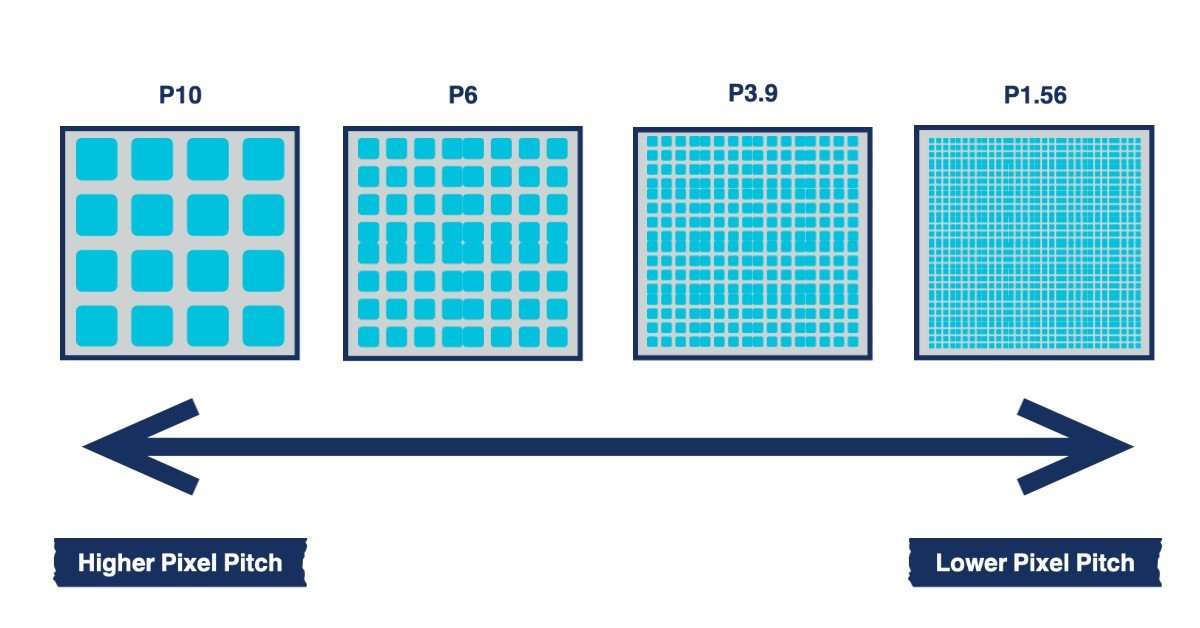
A smaller pixel pitch means high-density pixels, hence, more details. Meanwhile, a larger one means the pixels are far apart, hence, fewer details are allowed. Take a 1mm pixel pitch for example. The pixels are only 1mm apart. Meanwhile, a larger one means the pixels are far apart, hence, fewer details are allowed. Take a 1mm pixel pitch for example. The pixels are only 1mm apart. This is perfect for displays that will be under scrutiny, as the individual pixels won’t be noticeable. Meanwhile, a 10mm pixel pitch means the pixels are 10mm apart, which could be noticeable up close.
Pixel Pitch and Image Quality
As we defined above, pixel pitch could make or break an LED display. If you want more details to be shown on the screen, you need more pixels, and this means packing the pixels compactly, hence, the small pixel pitch. This will result in more detailed, sharper images that are pleasant to the viewers’ eyes.
- Sharpness and Clarity: Smaller pixel pitches allow LED displays to show images in great detail and clarity. This is perfect for environments where the audience will be close to the display like retail spaces or trade show exhibits. The tighter pixel spacing reduces pixelation and the image looks smooth and realistic.
- Viewing Distance: While it’s easy to just pick the smallest pixel pitch possible, it may not always be the most practical choice. It will still depend on how close or far the viewer will be to the LED display. The rule of thumb is the closer the audience, the smaller the pixel pitch, and vice versa.
- Color Accuracy: Higher pixel density also means better color accuracy and blending. When pixels are packed closer together colours blend more smoothly and look more natural and vibrant.
- Brightness: Pixel pitch affects the brightness of the display especially in harsh lighting environments. Smaller pixel pitches require more advanced LED technology to maintain brightness but are better in environments with varying light levels like bright outdoor spaces or well-lit indoor areas.
Pixel Pitch and Resolution
Resolution is how many pixels there are across a display’s width and height. To get this, simply multiply the numbers. So, an ultra-high definition (UHD) screen (3840 x 2160) will have around 8.2 million individual pixels.
However, just because your display has a high number of pixels doesn’t instantly mean it will result in high-quality images. A display’s resolution needs to be in sync with its pixel pitch to remain detailed. Smaller pixel pitches mean higher resolution and more detail. Larger pixel pitches mean fewer pixels across the display and less resolution but are still acceptable if the display is intended for far-away viewing.
Pixel Pitch and Viewing Distance
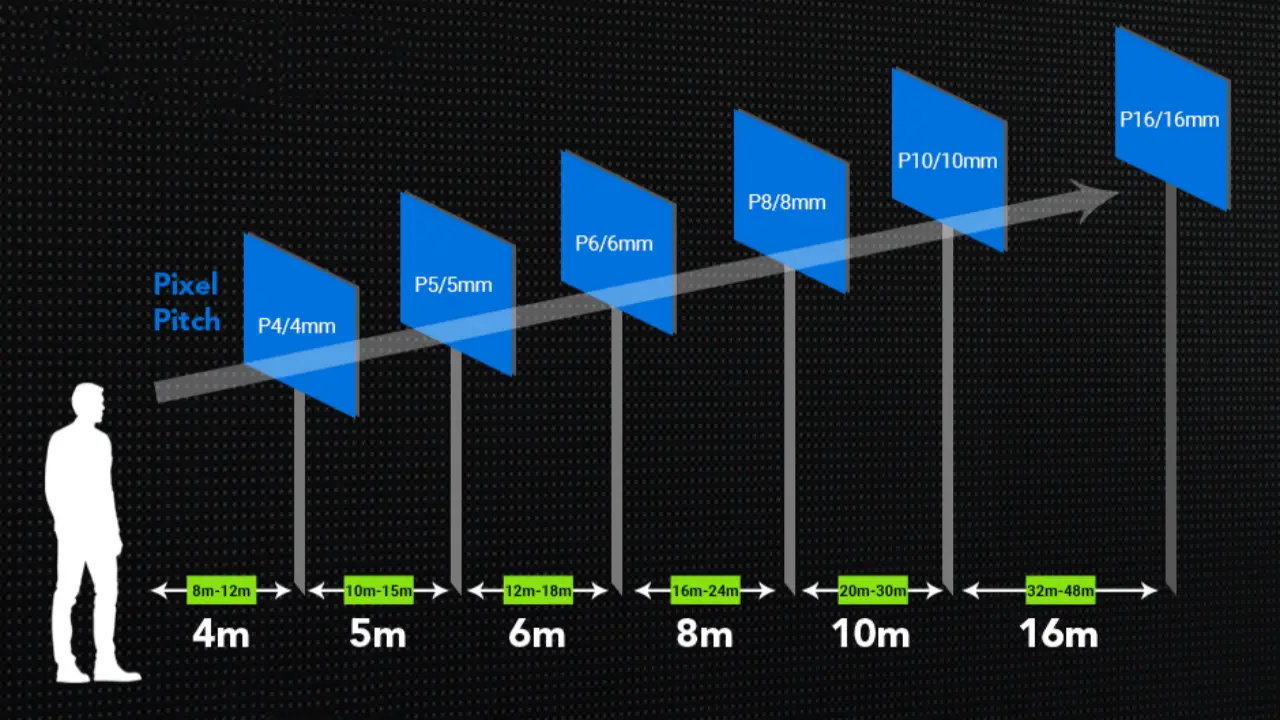
- Fine-Pitch for Close-Up Viewing: For applications like gallery installations or high-end retail displays, pixel pitches between 1.2mm and 2.5mm provide high resolution for close-up viewing. This means details are clear and smooth without pixelation perfect for viewers who will be standing just a few feet away.
- Medium Pixel Pitch for Moderate Viewing Distance: For conference rooms or auditoriums, pixel pitches around 2.5mm to 4mm are a balance between image quality and cost. At this pixel pitch HD resolution is achievable without the need for ultra-fine pitch, perfect for moderate viewing distance where clarity is important but close proximity isn’t.
- Large Pixel Pitch for Far Viewing Distance: Outdoor displays that will be viewed from afar can get away with using pixel pitches of 5mm or larger. Although these displays have lower resolution they are designed to be viewed from far away where the human eye can’t see individual pixels as easily and the image remains clear even at larger sizes.
Things to Consider When Choosing Pixel Pitch
You might think that going for the smallest possible pixel pitch is the default choice, but this is not always practical. Here are some things to take into account:
Viewing Distance
Viewing distance is the distance the audience will be from the display and still see a clear and cohesive image. Here are some general guidelines based on viewing distance:
- Close Viewing (under 10 feet): A small pixel pitch, 1.5mm to 2mm is recommended for close viewing distance. This gives high resolution and clear details even at close range, perfect for small retail displays or interactive exhibits.
- Mid-Range Viewing (10-20 feet): Pixel pitches 2.5mm to 4mm are good for moderate viewing distance, like conference rooms or auditoriums. This gives a balance between resolution and cost without sacrificing image quality.
- Long-Range Viewing (over 20 feet): For long-range displays like outdoor signs, pixel pitches of 5mm and above are usually suitable. At this distance, the pixel density can be lower since details are clear without the need for high resolution.
Environmental and Location Factors

The environment where the LED display will be installed can affect the choice of pixel pitch. Displays installed outdoors face lighting challenges like direct sunlight or varying ambient light, while indoor displays are in controlled lighting conditions.
- Outdoor Displays: For bright outdoor environments, a higher pixel pitch (e.g. P10 or P16) is effective since the viewing distance is farther. Brightness should be the priority for the outdoor environment to ensure visibility under direct sunlight.
- Indoor Displays: Indoor locations where lighting can be controlled are better for smaller pixel pitches (e.g. P2 or P3). This allows high-definition images for closer viewing without being affected by outdoor lighting.
- Lighting Conditions: Consider how ambient lighting will affect the display. For example, in a bright environment, robust technology is needed to maintain brightness and contrast. In controlled lighting, you have more options for pixel pitch without risking visibility issues.
Audience Interaction and Content Type

Displays for close audience interaction like digital kiosks or touch displays benefit from smaller pixel pitch to give a high level of detail. The type of content also matters; high-resolution video or detailed graphics need a finer pixel pitch to remain clear. Displays that will only show text or basic graphics that don’t require highly detailed recreations can get away with using larger pixel pitches.
Budget Constraints
Pixel pitch is directly related to the cost of the LED display. Smaller pixel pitches are more expensive because of higher pixel density and more advanced technology to achieve tight pixel spacing. The budget should consider not only the initial purchase price but also the operational costs:
- Initial Purchase: Smaller pixel pitch displays are more expensive because of more material and technology requirements.
- Operational Costs: High-density displays consume more power to maintain brightness, long long-term energy costs.
- Maintenance: Cleaning, repair, and component replacement may be required for optimal performance, especially for outdoor displays exposed to the elements.
- Software and Licensing: Managing content may require special software with a licensing fee, especially for dynamic displays that need regular updates.
Pixel Pitch Calculator
A common rule of thumb is 1mm of pixel pitch to every 8 feet of viewing distance. This makes decision-making easier by giving a quick way to estimate the ideal pixel pitch for different viewing distances.
Example
For an outdoor advertising display 50 feet away from the main pedestrian area, the calculation would be:
Pixel Pitch = Viewing Distance ÷ 8
Pixel Pitch = 50 ÷ 8 = 6.25mm
In this case, a pixel pitch of 6.25mm will give clear visuals for pedestrians at the viewing distance.
Pixel Pitch Comparison for LED Walls
Here is the comparison of pixel pitch with minimum and optimal viewing distance:
| Pixel Pitch | Minimum Viewing Distance | Optimal Viewing Distance |
| 0.9 mm | 7.2 feet (2.2 meters) | 10-15 feet (3.05-4.57 meters) |
| 1.2 mm | 9.6 feet (2.9 meters) | 10-15 feet (3.05-4.57 meters) |
| 1.5 mm | 12 feet (3.66 meters) | 15-20 feet (4.57-6.1 meters) |
| 1.87 mm | 15 feet (4.56 meters) | 15-20 feet (4.57-6.1 meters) |
| 2.5 mm | 20 feet (6.1 meters) | 20-30 feet (6.1-9.14 meters) |
| 3 mm | 24 feet (7.3 meters) | 25-35 feet (7.62-10.67 meters) |
| 4 mm | 32 feet (9.75 meters) | 40-50 feet (12.2-15.2 meters) |
| 5 mm | 40 feet (12.2 meters) | 50-60 feet (15.24-18.29 meters) |
| 6 mm | 48 feet (14.63 meters) | 60-75 feet (18.29-22.86 meters) |
| 8 mm | 64 feet (19.5 meters) | 70-100 feet (21.3-30.5 meters) |
| 10 mm | 80 feet (24.38 meters) | 100-120 feet (30.48-36.58 meters) |
Conclusion
Pixel pitch is crucial when choosing an LED display as it directly affects clarity, resolution, and viewing experience. Smaller pixel pitch gives sharper visuals for close-range viewing while larger pitch is for long-distance application, cost, and energy efficiency without compromising the visual impact. By matching the pixel pitch with the display’s purpose and audience distance, businesses and event organizers can create dynamic and engaging experiences for their specific needs whether for retail space, corporate events, or outdoor advertising.

