


When you think of the latest visual technology the P3 LED wall is top of the list for any event or advertising space. This is a grid of tiny light-emitting diodes (LEDs) packed tightly together to form a high-resolution screen with amazing picture quality.
But what makes a P3 LED wall different from other displays? It’s the pixel pitch which is just 3mm. This small distance between the pixels makes images sharp, attention-grabbing, and perfect for many applications.
Key Characteristics

The P3 LED wall is designed with several key characteristics that enhance its performance and usability:
- High Brightness: P3 LED walls are bright and attention-grabbing even in well-lit environments so your content will stand out.
- High Refresh Rates: Minimizes flicker for smoother video playback and better viewing experience.
- Wide Viewing Angles: P3 LED walls have wide angles, so visuals will still be clear and impactful even for audiences spread over large areas.
P3 LED Walls Applications

P3 LED walls are flexible and can be used in many industries. Their high resolution, bright, and dynamic display makes them suitable for many scenarios:
- Concerts and Live Events: P3 LED walls are great for creating stage backdrops and real-time effects and enhancing the audience experience. They can sync with sound and lighting systems to make the performance more engaging and memorable.
- Corporate Presentations and Conferences: Great for presenting complex information in professional environments, P3 LED walls have sharp text and clear visuals for presentations, product launches, and trade shows. Large and clear so everyone in the audience can see.
- Retail and Advertising Displays: Retailers use indoor or outdoor P3 LED walls for in-store displays and promotional content. Outside, they are digital billboards, displaying ads even in bright sunlight.
- Sports Arenas and Stadiums: P3 LED walls are digital scoreboards, replay displays, and crowd engagement tools. High res so you don’t miss a thing, and enhance the fan experience.
- Broadcast and Media Production: In studios, P3 LED walls are visually striking backdrops for news, talk shows, and entertainment programs. They can also be used for virtual sets and AR/VR integrations.
- Control Rooms and Command Centers: Control rooms use P3 LED walls to display multiple data streams, camera feeds, and situational updates, making them essential for security, traffic management, and utility monitoring.
- Educational Institutions: P3 LED walls enhance learning in lecture halls and STEM labs. They can display complex visuals, live demos, and interactive content, to help students understand difficult concepts.
- Churches: Churches use P3 LED walls to display lyrics, sermon notes, and multimedia content, to engage the congregation. For community events and announcements.
Benefits of Using a P3 LED Wall

- Better Visuals: One of the biggest benefits of a P3 LED wall is the better visuals. The high pixel density makes images sharp and clear and impossible to ignore. Whether it’s bright colors or detailed images your audience will love what they see.
- Flexibility: P3 LED walls are flexible. You can customize the content for different events, live performances, corporate events, or trade shows. Your P3 LED wall will serve you well in many scenarios.
- More Engagement: Research shows dynamic visuals grab attention more than static displays. Your audience will remember interactive presentations and dynamic ads more than traditional signage, resulting in higher retention and engagement. With a P3 LED wall, you can create an immersive experience that draws people in and makes your offerings unforgettable.
P3 LED Display Price: What You Need to Know
The price of a P3 LED wall can vary greatly depending on the size of the display, the quality of the LED modules, and additional features like waterproofing or higher brightness. Understanding these aspects will allow you to make an informed choice.
P3 LED Wall Price Factors
- P3 LED Wall Size: As P3 LED walls are priced per square meter, the bigger the wall the more expensive.
- Pixel Quality and Brightness: Higher brightness and better color accuracy will cost more.
- Installation Complexity: Complex installations may require custom framing, unique configurations, or advanced mounting options and will add to the overall cost.
- Brand Reputation: Well-known brands will cost more but often come with better reliability and after-sales service.
- Location and Shipping: Transportation and installation costs can add up quickly, especially for larger walls.
P3 LED Display Price Range
A P3 LED wall costs on average between $1,500 to $3,000 per square meter. Here’s a rough guide:
- Small Installations (1-5 square meters): $1,500 – $2,500 per square meter
- Medium Installations (6-20 square meters): $1,800 – $2,700 per square meter
- Large Installations (21+ square meters): $2,000 – $3,000 per square meter
For example, if you’re planning to install a 10 square meter P3 LED wall the base cost will be between $18,000 to $27,000 excluding installation and maintenance.
Choosing the Right P3 LED Wall Size
Choosing a suitable P3 LED screen specification is critical to making an impact and providing an enjoyable viewing experience. Here’s a step-by-step guide to help you choose the right size for your application.
Purpose
First, define the purpose of your P3 LED wall. Are you using it for ads, live events, or corporate presentations? The content and use will determine the right size.
- Ads: For ads a bigger wall is often better to make an impact.
- Presentations or Trade Shows: For smaller spaces or close-up viewing a compact wall that displays text and images clearly is best.
- Live Events: For larger spaces consider bigger displays to ensure visuals can be seen from far away.
Viewing Distance
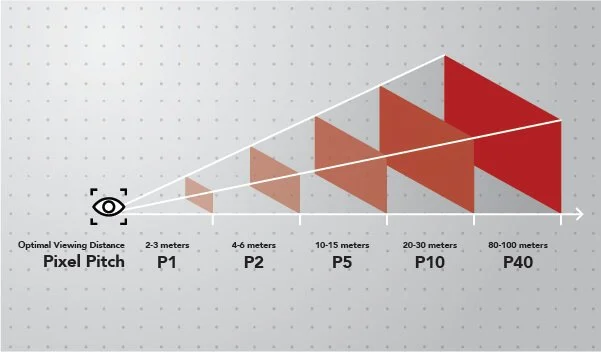
Viewing distance is a key factor in choosing the right screen size:
- Close Viewing (1-3 meters): Go for a smaller display, 5-10 square meters, for clear images.
- Medium Viewing Distance (4-10 meters): Medium-sized display, 10-20 square meters.
- Long Viewing Distance (10+ meters): Bigger displays, 20+ square meters, for large venues.
Space Available
Measure the area where the display will be installed to make sure the chosen size fits in the space without overwhelming it. Consider height restrictions and proximity to the audience.
Aspect Ratio
For video playback choose a size that matches the aspect ratio. 16:9 is standard for most content but for unique applications, you may need a custom size.
Budget
The cost of a P3 LED wall increases with size so balancing screen size and budget is key. Determine your budget and look for a size that gives you the best value.
Installation and Maintenance of P3 LED Walls
Installing a P3 LED wall is a precise process that should be done with care to avoid any issues. The first step is to conduct a site assessment to make sure the area can support the structure and power connections.
Follow these steps for a successful installation:
- Site Preparation: Measure and reinforce the installation area to support the weight and structure of the LED wall.
- Panel Setup: Install each LED module carefully following the manufacturer’s instructions.
- Connectivity: Connect power and data cables correctly.
- Calibration: Calibrate the screen for brightness, color, and image alignment.
Maintenance Tips
To keep your P3 LED wall running at its best:
- Regular Inspections: Check for loose connections or dead pixels.
- Cleaning: Use the right materials to clean the screen and avoid damage.
- Software Updates: Keep your LED wall’s software up to date to avoid compatibility issues.
Troubleshooting Common Problems
P3 LED walls are known for their high quality and reliability but like any technology, they can have occasional issues that can disrupt your display. Addressing these problems quickly is key to maintaining the wall’s performance and having a smooth visual experience. Below are some common problems you may encounter and how to troubleshoot them.
1. Flickering
Flickering is one of the most noticeable and annoying issues with LED walls. It not only disrupts the viewer’s experience but also signals underlying problems that need to be addressed. Here’s how to identify and fix the issue:
- Possible Causes:
- Inconsistent Power Supply: Voltage fluctuations or unstable power source.
- Loose or Faulty Cables: Damaged or incorrectly connected data and power cables.
- Software Issues: Outdated firmware or misconfigured settings.
- Solutions:
- Make sure the power supply is stable and consider using a voltage regulator to manage fluctuations.
- Check all power and data cables for secure connections or any visible damage.
- Update the LED wall’s software or reset the display to factory settings.
2. Dead Pixels or Pixelation

Dead pixels are annoying, pixelation can ruin the display quality and make images look grainy or distorted. Fixing these pixel-related issues will improve the screen’s visual impact.
- Possible Causes:
- Physical Damage: Minor bumps or drops during installation or use can damage pixels.
- Defective LEDs: Rare but can cause dead or stuck pixels.
- Data Transmission Issues: Poor data transmission can cause pixelation or distorted images.
- Solutions:
- Run a pixel repair test using built-in software tools to revive dead or stuck pixels.
- Replace individual LED modules if pixel issues persist and can’t be fixed through software.
- Check and replace faulty cables that may be causing data transmission issues.
3. Color Mismatch
Color accuracy is critical for P3 LED walls, especially in professional environments where visuals must be perfect. If your display shows uneven colors or has a yellowish/blue tint it’s time to recalibrate.
- Possible Causes:
- Incorrect Color Calibration: Poor color calibration can cause uneven tones and hues.
- Incompatible Software Settings: Sometimes software misconfigurations can cause mismatched colors.
- LED Module Mix: Mixing modules from different batches can cause color variations.
- Solutions:
- Use color calibration tools to adjust the RGB values and get a uniform color.
- Check the software settings for any discrepancies and adjust as needed.
- If using modules from different production batches replace mismatched modules to get uniformity.
4. Image Ghosting or Blurring
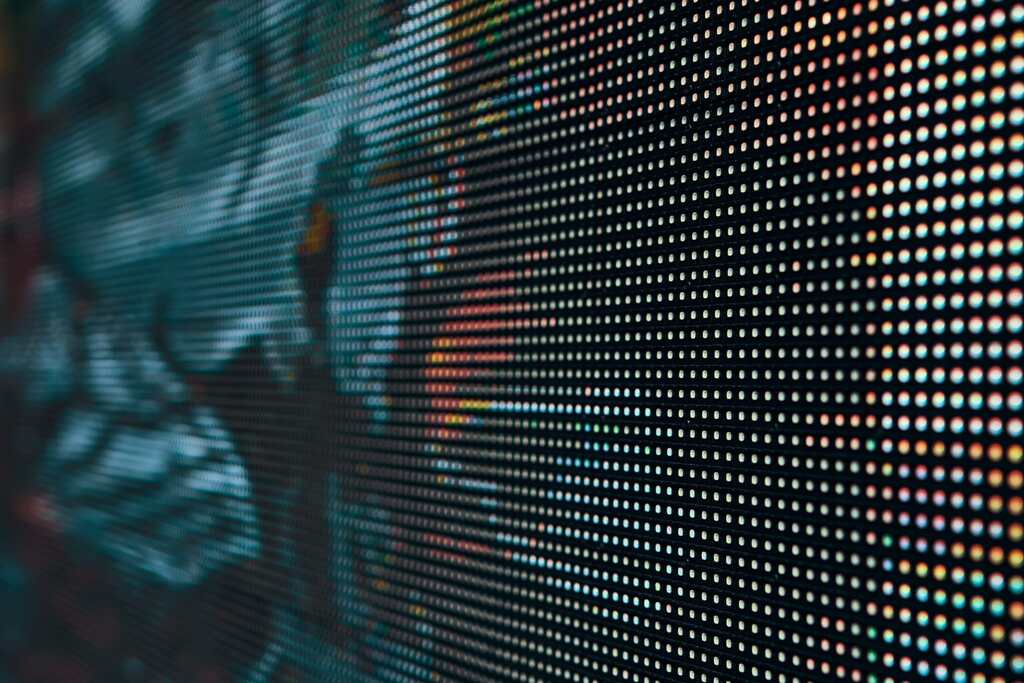
Ghosting or blurring can reduce the sharpness and clarity of visuals on a P3 LED wall making text unreadable and images hard to see.
- Possible Causes:
- Low Refresh Rate: A low refresh rate can cause motion blur, especially with fast-moving content.
- Poor Data Processing: Outdated software or hardware not optimized for data processing can cause ghosting.
- Solutions:
- Increase the refresh rate through the display’s settings menu or use a controller that supports higher refresh rates.
- Upgrade the data processing unit or use a newer version of the software.
5. Connectivity Issues
Connectivity issues such as unable to display content or intermittent screen blackouts can be caused by many factors including signal interference and hardware malfunction.
- Possible Causes:
- Loose Signal Cables: Loose HDMI, DVI, or other data cables can cause connectivity issues.
- Signal Interference: External factors like electromagnetic interference can disrupt the signal.
- Faulty Control Card: A malfunctioning control card can’t send data signals to the LED modules properly.
- Solutions:
- Check all cable connections and make sure they are secure and not damaged.
- Try using shielded cables to minimize interference or move the wall away from potential sources of interference.
- Replace or repair the control card if you suspect hardware malfunction.
6. Overheating and Brightness Drops
LED walls generate heat and if they overheat you may see a brightness drop or overall performance. Overheating can also shorten the life of your display.
- Possible Causes:
- Poor Ventilation: Lack of airflow around the LED wall can cause overheating.
- Excessive Brightness: Running the wall at maximum brightness for long periods can generate more heat.
- Dust Accumulation: Dust inside the LED modules can block heat dissipation.
- Solutions:
- Make sure there is enough ventilation around the P3 LED wall, with fans or a cooling system if needed.
- Adjust the brightness to an optimal level that balances visibility and heat.
- Clean the LED modules and surrounding areas regularly to remove dust or debris that can trap heat.
When to Call for Help
While most of these issues can be resolved with in-house troubleshooting, there are times when you need professional help. If you can’t resolve the issue or if it involves hardware replacement or complex software configuration, better call the manufacturer or a certified technician. Professional help not only fixes the problem but also prevents damage that may be caused by improper handling.
Conclusion: Why You Should Consider a P3 LED Wall
P3 LED walls can boost your visual communication strategy. With great visual quality, flexibility, and ability to engage, P3 LED walls are perfect for any business, event, or presentation.
As you look into your options, remember to think through your needs, understand your environment, and consider your budget. By choosing the right P3 LED wall, you’re not just buying a product, you’re investing in a future where visual storytelling is the main show.

