


Energy efficiency is important for cost savings and environmental sustainability whether you’re running a home office or a business. When it comes to displays, energy-efficient technologies can make a big difference to your overall energy usage. From small screens on your mobile devices to giant digital billboards, energy-efficient displays are more accessible than ever.
In this guide you’ll learn about the different energy-efficient display technologies, how they compare, and practical ways to make your digital displays more energy-efficient. Whether you want to save money or help the planet, this post will help you find the answers.
Why Energy Efficiency in Displays Matters
When you think of energy consumption, you probably think of lighting, heating, or cooling systems. But displays – whether TV, monitor, or digital billboard – are big energy consumers, especially when used 24/7 in a commercial environment.
Key Benefits of Energy-Efficient Displays:

- Cost Savings: Less energy consumption means lower electricity bills whether you have a few monitors or a whole network of digital signage.
- Environmental Impact: Energy-efficient displays reduce your carbon footprint in line with your sustainability targets.
- Lifespan of Equipment: Many energy-efficient technologies also extend the life of your displays by reducing wear and tear on hardware components
Energy Star Certification
Energy Star-certified displays meet the EPA’s strict energy efficiency standards. Look for the Energy Star logo when buying displays as it means the display has been optimized for power use without sacrificing performance.
Factors That Affect Energy Consumption in Displays
Before diving into the different display technologies, it’s important to understand what factors affect the energy consumption of your screen:
Display Size
Larger screens require more power. For example, a 32-inch LED display will generally consume less power than a 75-inch display of the same type, simply because more area needs to be lit.
Brightness
The brighter your display, the more energy it will consume. Many display systems automatically adjust brightness based on ambient light, but manually reducing brightness where possible can significantly lower power consumption.
Content Being Displayed
Displays showing static images use less energy than those displaying videos or animations, which require constant refreshing and higher processing power.
Type of Display Technology
Different types of displays have different energy profiles. We’ll cover these in more detail below.
Comparing Display Technologies
The Industry Standard for Energy Efficiency: LED Displays

LED (Light-Emitting Diode) is the way to go for energy efficiency. When used as a screen backlight, LEDs are super bright and use less power than older technology like LCD or plasma screens.
Why Choose LED Displays:
- Less Power Consumption: LED backlighting is more efficient than fluorescent lighting in traditional LCD screens.
- Brightness Control: LED displays allow for precise brightness adjustment which means more energy savings.
- Durability: LEDs last longer and are less prone to screen burn-in or degradation.
Applications:
- Digital Signage: LED screens are perfect for digital billboards and signage due to their brightness and energy efficiency.
- Home TVs and Monitors: Many modern TVs and monitors use LED technology, an efficient alternative to older LCD screens.
High Efficiency for Small Screens with OLED

Especially for small devices like smartphones and tablets, OLED (Organic Light light-emitting diode) is great for picture quality and power efficiency. Because each pixel in an OLED screen generates its own light, a backlight is not necessary.
Why Choose OLED:
- No Backlight: This means less energy consumption, especially when displaying black images.
- High Contrast: OLED produces real blacks, good for gaming monitors and movie screens that need a lot of contrast.
Applications:
- Smartphones and Tablets: OLED is used in most high-end mobile devices, smartphones, and tablets.
- Premium TVs: OLED is often used in high-end home entertainment systems for energy savings and better image quality.
E-paper: Ultra-Efficient for Static Content
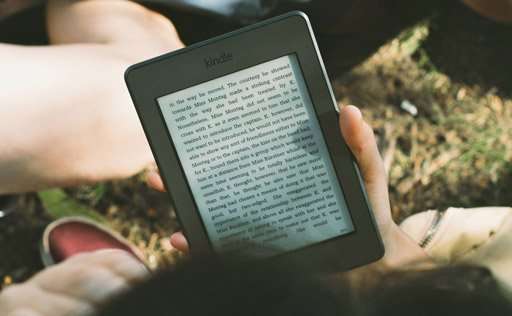
E-paper (electronic paper) displays are ultra-efficient because they only consume power when the image on the screen changes. This makes them perfect for devices like e-readers where static content is displayed for long periods.
Why Choose E-paper:
- Minimal Power Consumption: E-paper consumes power only when refreshing the screen, making it the most energy-efficient display for static images.
- Visibility: E-paper displays are highly visible in direct sunlight, perfect for outdoor signage in low-energy setups.
Applications:
- E-readers: Devices like Amazon’s Kindle use e-paper technology to extend battery life.
- Low-Energy Signage: E-paper displays can be used for signage that doesn’t require frequent content change, like price displays in retail stores.
LCD Displays: Traditional but Still Relevant

LCD (Liquid Crystal Display) screens have been around for decades and are less energy efficient than LED or OLED displays. But with advancements in backlight technology like switching from CCFL (Cold Cathode Fluorescent Lamps) to LED backlighting, modern LCDs are much more efficient than their old counterparts.
Why Choose LCD:
- Better Efficiency: Not as energy efficient as OLED or LED, but modern LCDs are a good middle ground for cost and efficiency.
- Affordable: LCDs are more budget-friendly than OLED, especially in larger sizes.
Applications:
- Monitors and TVs: LCDs are still used in consumer electronics for affordability and decent energy efficiency.
- Commercial Displays: You’ll still find LCDs in many commercial and retail environments especially when budget is a constraint.
Emerging Technologies: Quantum Dots and MicroLED

Newer technologies like Quantum Dot and MicroLED displays will be even more energy efficient but are still in the early stages of mass adoption.
- Quantum Dot improves the efficiency of LED displays by enhancing color accuracy and brightness without increasing power consumption.
- MicroLED is the next evolution of LED, providing even better efficiency and picture quality but at a higher initial cost.
How to Maximize Energy Efficiency in Your Displays
Once you’ve chosen the right display, here are some ways to get the most out of it:
Adjust Brightness
- Auto Brightness: Enable auto-brightness so it adjusts to ambient light. This saves energy when the display doesn’t need to be at full brightness.
- Manual Adjustments: In low-light environments, you can manually lower the brightness to save power.
Schedule Display Usage
- Turn Off When Not in Use: For digital signage, schedule displays downtime when they’re not in use, like overnight or during business hours.
- Display Content Scheduling: Use power-saving settings to display static images during off-peak hours and save animations or videos for peak times.
Use Energy-Saving Modes
Many displays have power-saving modes that reduce power consumption when the screen is idle or showing simple content. Make sure to enable these features, especially in business environments where displays might run 24/7.
Smart Sensors
Get displays with built-in sensors that adjust settings based on environmental conditions like brightness and motion detection. These sensors can automatically dim the screen when no one is around, saving even more energy.
The Importance of Energy-Efficient Displays in Sustainability
Saving energy in your displays isn’t just about saving money–it’s also part of the sustainability journey. Whether you’re using digital signage in a commercial environment or energy-efficient monitors in your home office, the right display can reduce your carbon footprint.
Renewable Energy Integration
Energy-efficient displays can be paired with renewable energy sources like solar power to create fully sustainable systems. Solar-powered digital billboards are becoming more common a nearly zero-emission advertising solution.
Large-Scale Impact
In large commercial installations like billboards or public displays using energy-efficient technologies like LED or e-paper can reduce the overall energy required to power multiple screens. This means lower greenhouse gas emissions.
Energy-Efficient Display Trends
As technology advances, display manufacturers are innovating to create even more energy-efficient solutions. Here are a few to watch:
MicroLED
MicroLED display technology is still in its infancy, but it promises to be the next big thing in energy-efficient displays. With even higher brightness and better color accuracy with less power, they could soon replace traditional LEDs and OLEDs in both consumer electronics and large signage.
Flexible and Transparent Displays
Future displays may use flexible or transparent materials to reduce power consumption and more use cases like curved digital signage or commercial displays.
Improved E-paper
E-paper is getting better with full-color e-paper displays on the horizon. These would be perfect for ultra-low power signage that needs color and visibility in all lighting conditions.
What to Look For in an Energy-Efficient Display
When choosing energy-efficient displays several key features can impact both performance and power consumption. Here’s a breakdown:
High Brightness LED Low Voltage
- LED Chips: Look for LED chips that can maintain 7000-7500 nits even at low voltage. This ensures the display is bright and visible in all lighting conditions without consuming too much power.
- Low Working Voltage: Energy-efficient displays use low working voltage to minimize electromagnetic interference. A double-circuit system with 2.8V and 3.8V for modules and control systems can improve performance and reduce power consumption.
LED Display Modules with Low Power Supply

Knowing the optimal working voltage is key. For example, red LEDs work best at 1.8V to 2.8V, blue and green LEDs at 2.8V to 3.8V. Traditional LED displays use a much higher unified voltage (5V) which results in unnecessary power waste.
Energy-saving displays like ES960 use a dual voltage power supply design, red LED chips work at 2.8V and green/blue chips at 3.8V. This targeted voltage supply ensures each LED type works within its optimal range.
Different PCB Board Design
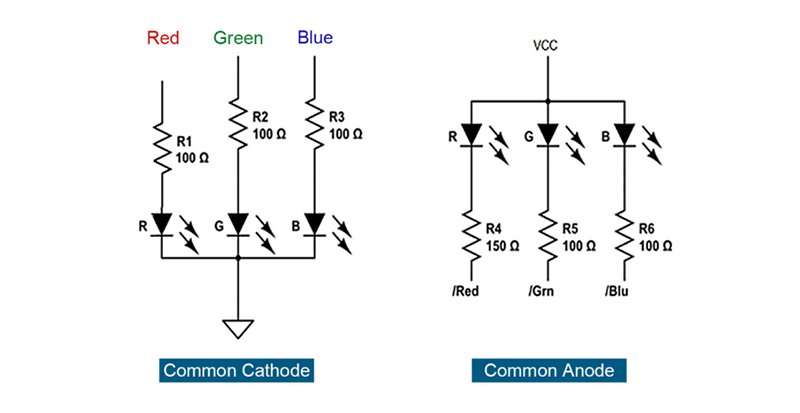
PCB (Printed Circuit Board) design is important for energy efficiency. Energy-saving LED displays use a common cathode design, so the voltage can be distributed accurately to each LED chip. This can be visualized as a swimming pool, where the PCB is the pool and the power supply is the water, each lamp works in its ideal environment.
Traditional LED displays use a common anode design, where the power supply is uniform. This will cause voltage differences and consume more power.
Advanced Driving IC Technologies
The choice of driving ICs is important for energy efficiency. Energy-saving LED displays use innovative driver ICs with low switching voltage and common cathode design. For example, the energy-saving ICN2049 is better than ICN2037, it saves 5-8% power due to lower switching voltage and up to 25% due to design.
Key differences between these ICs are:
- Output Current Settings: ICN2049 can work at lower output current settings (up to 25mA at lower voltage) than ICN2037 which works at higher output current range.
- Current Accuracy: Energy-saving ICs have better accuracy and less variation between channels and ICs which results in better performance and lower power consumption.
- Working Voltage: ICN2049 works at a lower voltage (2.6V to 5V) than ICN2037 (3.3V to 5V) which optimizes power consumption.
How to Calculate Power Consumption of LED Displays
To calculate your LED display’s energy efficiency and potential cost savings, you need to know how much power it uses. To find out how much power your LED display consumes:
Formula
Power (W) = Screen Area (m²) x Power Density (W/m²) x Brightness (%)
- Screen Area: This is the total area of the display in square meters.
- Power Density: Amount of power spent per square meter. Measured in watts (W/m²).
- Brightness: The brightness of your display, as a decimal (e.g. 60% = 0.60).
Example
To find out the power consumption of a 7m x 7m LED display (49 m²), with 600 Watts and a 60% brightness:
- Screen Area: 7m x 7m = 49m²
- Power Density: 600 W/m²
- Brightness: 60% (0.60)
So, the calculation would be:
Power Consumption = 49m²×600W/m²×0.60=17,640W
Recommended LED Signage Wattage
Choosing the right LED wattage for your signage is crucial for visibility and compliance. Here’s what to consider:
Considerations
- Sign Size and Location: Larger signs or signs in well-lit areas need more wattage.
- Sign Design: Complex designs with multiple colors may need more wattage to illuminate details.
- Environmental Conditions: Outdoor signs may need more power due to varying light conditions and weather.
- Signage Purpose: What is the purpose of the sign (advertising, branding, wayfinding)?
Wattage for Different Sign Types
- Channel Letter Signs:
- Small letters: 3-6 watts per letter.
- Large letters: up to 10 watts or more per letter depending on size and brightness.
- Neon Sign Replacements: Use LEDs at 70% of the original neon wattage for similar brightness with energy savings.
- Outdoor Signs: 10-20 watts per square foot for maximum visibility.
- Monument Signs: 20-30 watts per square foot starting point, adjust according to size and visibility requirements.
Conclusion
In a world where energy efficiency matters, the right display can make a big difference. Whether you’re buying a new display for your home, office, or business there are many energy-efficient options to choose from.
- LED displays offer a good balance of brightness, energy saving, and cost so are suitable for most environments.
- OLED displays offer better picture quality and energy saving in darker environments.
- E-paper displays are the best for static content and use almost no power once the content is displayed.
- Emerging tech like MicroLED will be even more efficient and better as they become more mainstream.
By carefully selecting and optimizing your display, you can reduce energy consumption, lower operational costs, and contribute to a more sustainable future.

